Free llms.txt generator.No dead links. Nothing made up.
Create an llms.txt file for your website in under a minute. We pick your most important pages, check that each one works and turn them into a clean, spec-compliant llms.txt that AI models can read in one pass.
- addresses read
- 38
- addresses read
- pages checked
- 35
- pages checked
- pages listed
- 31
- pages listed
 Wix
Wix Shopify
 WordPress
 Webflow
 Squarespace
 Ghost
Ghost Next.js
How to create an llms.txt file in three steps
- 01
Enter your website URL
Paste your homepage address and press Generate. You don’t need an account or a credit card.
- 02
We read and check your pages
The generator reads your sitemap and main menu, picks up to 80 of your most important pages, checks each one and sorts the working ones into clear sections.
- 03
Copy it to your site
Edit the file if you like, then copy or download it and upload it to your site’s root with the guide for your platform.
What is an llms.txt file?
An llms.txt file is a short Markdown file at the root of your website, at yoursite.com/llms.txt. It gives AI models a curated summary of your site: who you are, what you offer and links to your most important pages, each with a one-line description. Think of it as a sitemap written for large language models.
Jeremy Howard proposed the format at llmstxt.org in September 2024, and Shopify, Wix, Webflow, Squarespace, Ghost and Yoast SEO all support it today. Read ours at trysearchlift.com/llms.txt.
llms.txt vs robots.txt vs sitemap.xml
Why our llms.txt generator writes a better file
A useful llms.txt is short, accurate and written in your own words. The generator handles all three for you.
Every link in your file is checked
We pick up to 80 of your most important pages from your sitemap and main menu and check each one. Broken pages, redirects and noindex pages are left out, so the links in your llms.txt all work.
/pricing200Listed/services/web-design200Listed/spring-saleBroken page404Left out/old-offerRedirects to the homepage301Left out/thank-youHidden from searchnoindexLeft out
A free llms.txt checker, built in
Shopify serves a default llms.txt on every store, and Wix writes one for premium sites. We score yours against the llms.txt spec so you know whether to keep it or replace it.
- Has no summary line
- Links to fewer than three pages
A free site health check
Every run flags broken pages still in your sitemap, pages missing a meta description and a homepage that’s blocked from indexing.
- 2 pages in your sitemap answer with an error.
- 5 pages have no meta description.
- Your homepage can be indexed.
Your words, not AI guesses
Link names come from your page titles, and descriptions from your own meta descriptions. Nothing is rewritten or invented.
On your pricing page
<meta name="description" content="SearchLift AI pricing: a free plan with a real AI SEO audit and AI visibility tracking…">
In your llms.txt
- [AI SEO Pricing](…/pricing): SearchLift AI pricing: a free plan with a real AI SEO audit and AI visibility tracking…
Setup steps for your platform
We detect whether your site runs on Shopify, WordPress, Wix, Webflow, Squarespace, Ghost or Next.js and open the exact steps for it.
YoursHow to add llms.txt to your website
Your llms.txt has to live at the root of your domain, at yoursite.com/llms.txt. Choose your platform for step-by-step instructions taken from its own documentation. When you generate a file, we open the right guide for you.
How to add llms.txt to Wix
Wix writes an llms.txt for you and keeps it up to date on sites with a premium plan, a connected domain and search engine indexing turned on. You can replace what it says with your own file.
Where to find it
- Dashboard
- SEO & GEO
- Tools and settings
- Go to llms.txt
Steps from the Wix Help Center, checked 30 September 2026.
- 1In your site’s dashboard, go to SEO & GEO.
- 2Scroll down to Tools and settings and click Go to llms.txt.
- 3Open the More Actions menu, click Edit file, then click Continue.
- 4Replace the text with your file and click Save Changes.
Once you edit the file, Wix stops updating it automatically. Reset to Default, in the same place, brings the automatic version back.
How to add llms.txt to Shopify
Since 28 May 2026 every Shopify store serves a default llms.txt that Shopify generates. To serve your own, add one template to your theme.
Where to find it
- Online Store
- Themes
- Edit code
- Templates
- llms.txt.liquid
Steps from the Shopify developer documentation, checked 30 September 2026.
- 1In your Shopify admin, go to Online Store, then Themes.
- 2Next to your live theme, open the three-dot menu and click Edit code.
- 3Right-click the Templates folder, choose New File and name it llms.txt.liquid.
- 4Paste your file into the new template and click Save.
The template accepts plain text and Markdown, so the file goes in as it is. It changes /llms.txt only; /agents.md and /llms-full.txt keep Shopify’s version. If you switch themes, copy the template across.
How to add llms.txt to WordPress
WordPress has no llms.txt of its own. Upload the file to the folder your site runs from, or let an SEO plugin write one.
Where to find it
- File manager or SFTP
- public_html
- llms.txt
Steps from the Yoast help, checked 30 September 2026.
- 1Open your host’s file manager, or connect to your site with SFTP.
- 2Go to the folder that holds wp-config.php, usually public_html or www.
- 3Upload the file, named exactly llms.txt.
- 4Open yoursite.com/llms.txt to check that it shows.
If the llms.txt feature in Yoast SEO is switched on (Settings, then Site features, under AI tools), Yoast writes its own file to the same place and refreshes it every week, which would replace yours. Switch it off first, or keep Yoast’s file and use this one to check what yours should say.
How to add llms.txt to Webflow
Webflow takes an uploaded llms.txt in Site settings and serves it at the root of your custom domain.
Where to find it
- Site settings
- SEO
- LLMs.txt
- Upload file
Steps from the Webflow Help Center, checked 30 September 2026.
- 1Open Site settings and go to the SEO tab.
- 2Under LLMs.txt, click Upload file and choose your llms.txt.
- 3Click Save changes.
- 4Publish the site to your custom domain.
The file has to be UTF-8 and under 100 KB, which every file this generator writes is. It is not served on the webflow.io staging domain.
How to add llms.txt to Squarespace
Squarespace 7.1 sites have an llms.txt setting. It stays off until you give it some text.
Where to find it
- SEO/AI Visibility
- SEO Settings
- LLMS.txt
Steps from the Squarespace Help Center, checked 30 September 2026.
- 1Open the SEO/AI Visibility panel and click SEO Settings.
- 2Click the LLMS.txt tab.
- 3Paste your file into the text field.
- 4Click Save.
To take the file down again, open the same tab, click Delete, then Save.
How to add llms.txt to Ghost
Ghost builds its own llms.txt from your posts and pages once you switch on its AI search setting, which is off by default on existing sites.
Where to find it
- Settings
- Meta data
- AI search
Steps from the Ghost changelog, checked 30 September 2026.
- 1In Ghost Admin, open Settings.
- 2Go to Meta data and switch on the AI search setting.
- 3Open yoursite.com/llms.txt to read what Ghost wrote.
Ghost writes the file from your content, so compare it with the one here: a page that errors, or has no description, is worth fixing in Ghost itself.
How to add llms.txt to Next.js and static sites
A file in your public folder is served from the root of the site exactly as it is.
Where to find it
- public
- llms.txt
- 1Save the file as llms.txt.
- 2Put it in public/ for Next.js, Astro, Nuxt, Remix or Vite, or in static/ for SvelteKit, Hugo, Gatsby or Docusaurus.
- 3Deploy the site.
- 4Open yoursite.com/llms.txt to check that it shows.
How to add llms.txt to any web server
Anything that serves files can serve this one.
Where to find it
- Web root
- llms.txt
- 1Upload llms.txt to your web root: the folder your homepage file lives in.
- 2If your server lets you set it, serve the file as text/plain; charset=utf-8.
- 3Open yoursite.com/llms.txt. You should see the text, not your homepage or a not-found page.
Test your llms.txt
Open yoursite.com/llms.txt in a private window. You should see plain text starting with # and your site’s name. If you see your homepage or a 404 page, the file isn’t at the root yet.
Link to it from your pages
Version 2 of the llms.txt proposal, published in August 2026, lets each page point to your llms.txt with one line in the page head or an HTTP header. It’s optional.
In the head of your pages
<link rel="describedby" href="/llms.txt">Or as a response header
Link: </llms.txt>; rel="describedby"Update it when your site changes
Regenerate your llms.txt whenever you add pages or products, or change prices, hours or your address. It takes a minute.
See what ChatGPT says about your business.
Your llms.txt describes your site. SearchLift shows you what ChatGPT, Claude, Perplexity, Gemini and Grok actually say when customers ask for what you sell: whether they recommend you, who they name instead and which pages they cite.
- Track your AI visibility across five AI assistants.
- See which competitors get recommended instead of you.
- Fix your pages for Google and AI search, with one-click undo.
Start on the free plan with one tracked question and a 10-page audit. Paid plans start at $8.99 a month.
How AI visibility tracking works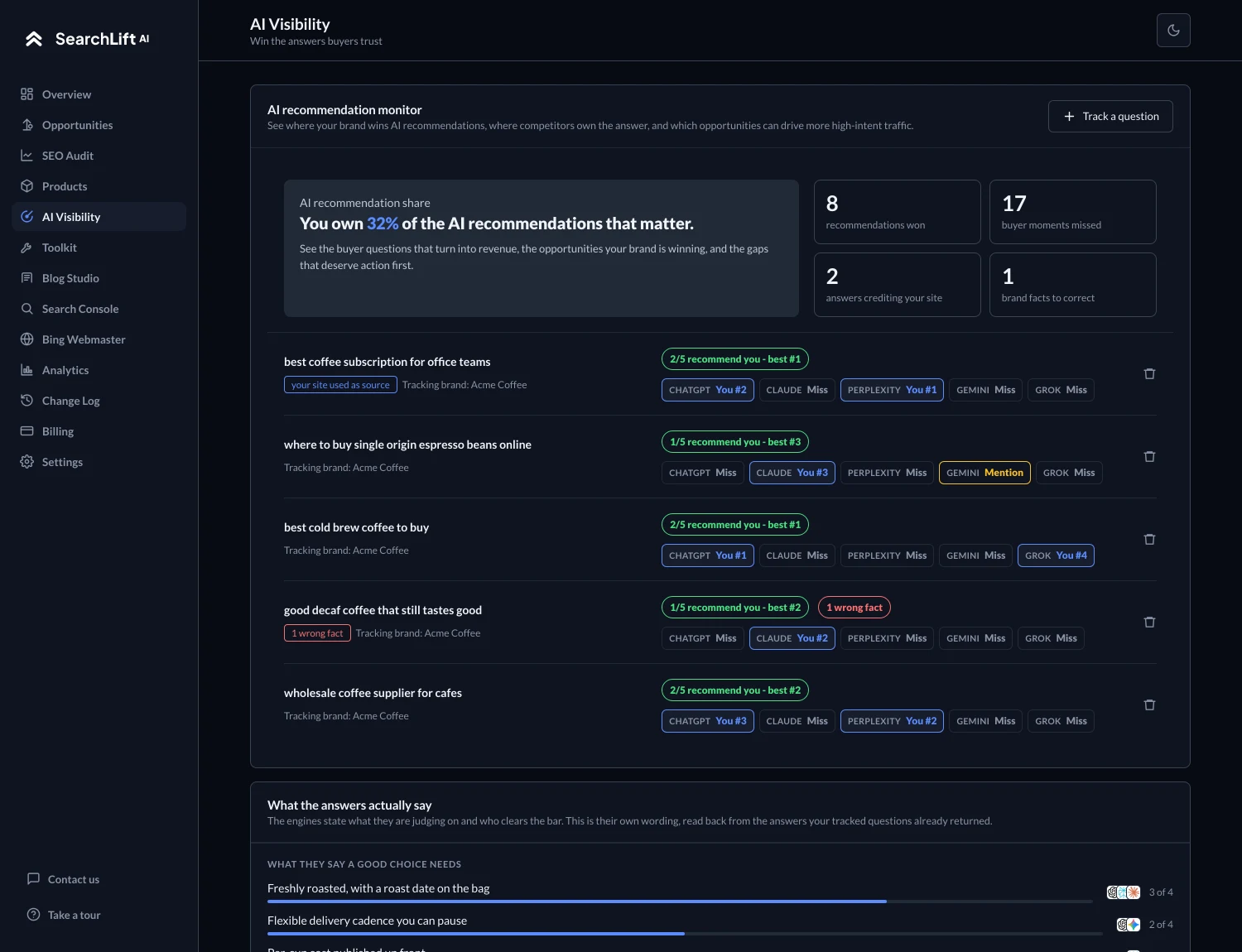
llms.txt questions, answered
Want the long version, with every source quoted? Read our complete guide to llms.txt.
What is an llms.txt file?
An llms.txt file is a Markdown file at the root of a website (yoursite.com/llms.txt) that gives AI models a short, curated guide to the site: a title, a one-line summary and links to the most important pages, each with a brief description. Jeremy Howard proposed the format at llmstxt.org in September 2024.
How do I create an llms.txt file?
Enter your website URL in the generator at the top of this page. It reads your sitemap and main menu, checks each page and writes the file in the llms.txt format. Review it, then copy or download it and upload it to the root of your site.
Is this llms.txt generator free?
Yes, completely free, with no account needed, and you get the complete file. To keep it fast for everyone, each visitor can generate up to ten files an hour.
Where do I put my llms.txt file?
At the root of your domain, so it loads at yoursite.com/llms.txt. The guides on this page cover Shopify, WordPress, Wix, Webflow, Squarespace, Ghost, Next.js and any other web server.
What should an llms.txt file include?
An H1 with your site or business name, a one-line summary in a blockquote, and sections under H2 headings that list your key pages as Markdown links, each with a short description. Keep it to the pages that matter: an llms.txt is a guide, not a copy of your sitemap.
Does llms.txt help SEO?
Not for Google rankings. Google’s AI optimization guide says Google Search ignores llms.txt files, so having one will neither help nor hurt your rankings. The file is written for AI tools and agents that look for it.
Do ChatGPT, Claude and Perplexity use llms.txt?
None of them has documented reading a website’s llms.txt as of 30 September 2026, though OpenAI, Anthropic, Google and Perplexity all publish one for their own developer documentation. To see what those assistants actually say about your business, use SearchLift’s AI visibility tracking.
What’s the difference between llms.txt and robots.txt?
robots.txt tells crawlers which pages they may visit. llms.txt tells AI models what your site is about and which pages matter most. An llms.txt doesn’t block or allow anything, so use robots.txt to control AI crawlers.
My platform already creates an llms.txt. Should I replace it?
Shopify, Wix, Ghost and Yoast SEO can each write one for you, built from what the platform stores. This generator builds yours from what your live pages say, with broken and hidden pages left out, and scores your current file so you can compare the two. On Wix, editing the file stops Wix updating it automatically.
Why is a page missing from my llms.txt?
Pages that return an error, redirect to your homepage or are set to noindex are left out on purpose, as are carts, account pages, search results, tag archives and pagination. Each section also keeps only your most important pages: up to 20 pages, 15 docs, 12 products, 8 collections, 12 articles and 8 policies. You can add anything else before you download.
How often should I update my llms.txt?
Whenever your pages, products, prices or contact details change. An outdated llms.txt gives AI tools outdated facts, so regenerate it after any change that matters.
What does the generator read on my site?
Only public pages, the way a search engine does: your homepage, robots.txt, sitemaps and the head of up to 80 pages. It never logs in or submits forms, and it doesn’t keep a copy of your pages or your file.
What is llms-full.txt?
A companion file some sites publish with the full text of their content in one document. It isn’t part of the llms.txt proposal, and this generator creates llms.txt only. Shopify and Ghost serve one automatically when their llms.txt feature is on.
Create your llms.txt in under a minute.
Enter your website and get a clean, checked llms.txt you can publish today.