



AI SEO articles written from your Notion databases
Notion is not a website, so there is no SEO to write to it. What it is, for many teams, is where the knowledge lives. SearchLift reads it to base articles on your own facts, hands the finished pieces back as Notion pages, and audits and tracks your real website like any URL.
 Publishing destination
Publishes articles
What SearchLift does on Notion.
- Reads the databases you share so article drafts use your own material
- Creates finished articles as pages in the database you choose
- Audits your real website by public crawl, exactly like any URL
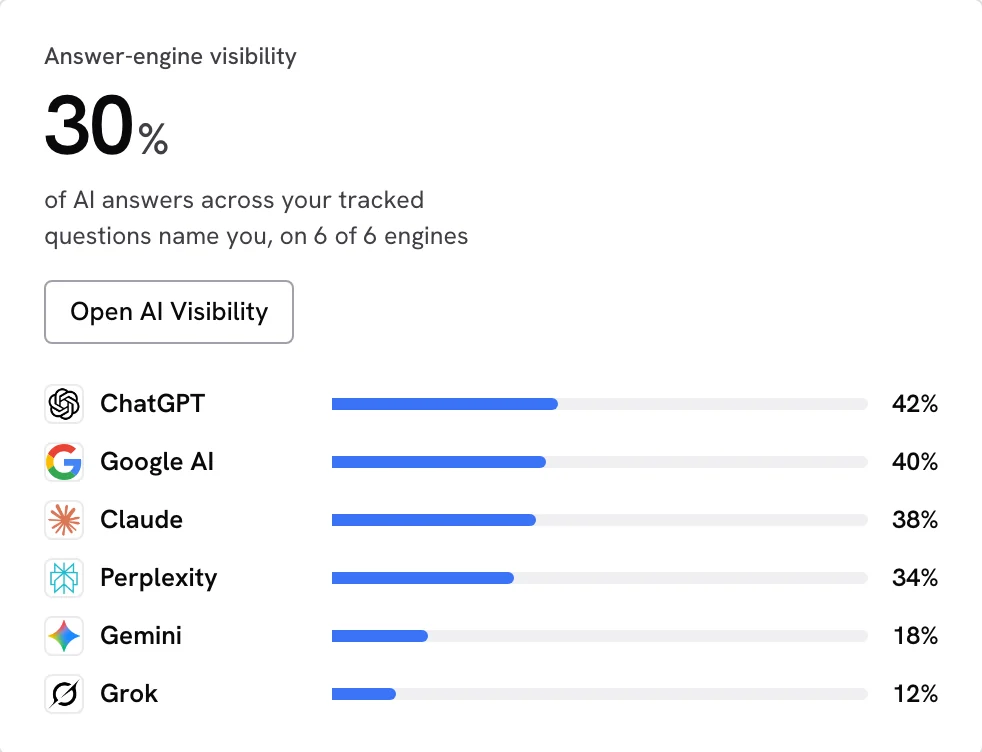
- Tracks buyer questions across all five assistants
- Connects Google Search Console for your real site
How it connects
Sign in with Notion, or create an internal integration and paste its secret, then share the database articles should be created in with the integration.
What stays manual
SEO fixes on your actual website, which arrive as suggestions or as a developer work order, since Notion is not where the site lives.
How onboarding works
From sign-up to your first fix.
- Step 1 of 4Sign up free
Create your account in a minute. The free plan needs no card, and every plan comes with 24/7 support.
- Step 2 of 4Connect your site
One click for WordPress, Shopify, Webflow, Wix and the other platforms we support, or paste the URL of any site.
- Step 3 of 4See your score
Minutes later you have your SEO and AI score, the pages to fix first and what the AI assistants say about you.
- Step 4 of 4Approve the fixes
SearchLift fixes titles, schema and content for you. You approve each change, and any fix can be undone in a click.
Notion FAQ
Notion specifics.
Everything else, including ChatGPT SEO and AI visibility tracking, is the same on every connector.
Contact usCan it fix my Notion-hosted site?
It audits it like any public URL and gives you the fixes as instructions. Notion has no SEO fields to write through the API.
Why does it say no database was found?
An integration only sees pages that have been shared with it. Open the database page in Notion, choose Connections, pick SearchLift, and it appears on the next test.
Track what ChatGPT, Claude, Perplexity, Gemini, Google AI and Grok say about your business.
 ChatGPT,
 Claude,
 Perplexity,
 Gemini,
 Google AI
 Grok
The platform, on Notion