For two years the honest answer to “how do I control whether Google’s AI features use my site?” was that you could not, not separately. Eligibility followed ordinary Search: if you were indexed and snippet-eligible, you were in. That changed on 31 August 2026, when Google finished rolling out the Search generative AI control to every site worldwide. It is a setting in Search Console, it is the first switch that speaks directly to AI Overviews and AI Mode, and because it was rolled out silently to properties nobody had reason to re-open, most site owners have never seen it.
Where it lives
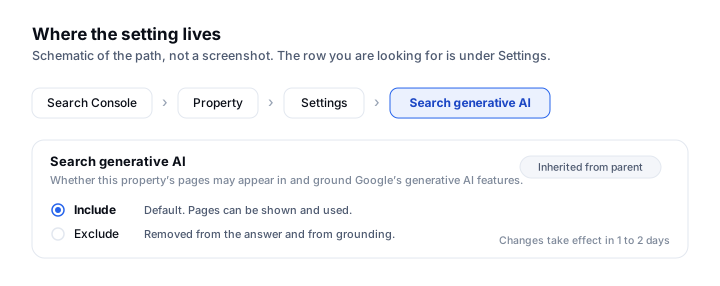
- 01Open Google Search Console and select the property you want to check.
- 02Go to Settings in the left-hand navigation.
- 03Find Search generative AI in the settings list. If you have never touched it, it will show the inherited default rather than an explicit choice.
- 04Read which value is set and whether it is inherited or set on this property. Inheritance is the part that catches people out, and it is covered below.
- 05If you change it, expect one to two days before the change takes effect. Note the date you changed it so you can line it up against your Generative AI performance report later.
What excluding actually does
Excluding is broader than people assume. It does not merely remove the little link cards under an AI Overview. It removes your content from grounding too, which is Google’s word for the step where the model reads your page to write its answer. So the choice is not “cited or not cited”. It is “used or not used”. A site that excludes itself is not quietly summarised without credit; it is absent from the answer.
What it does not do is equally important. Google’s help documentation is explicit that the control is not used as a ranking or inclusion signal affecting other parts of Search. Setting it to exclude does not demote you in the ten blue links, and setting it to include does not promote you. It is a visibility gate for one surface, not a lever on the rest.
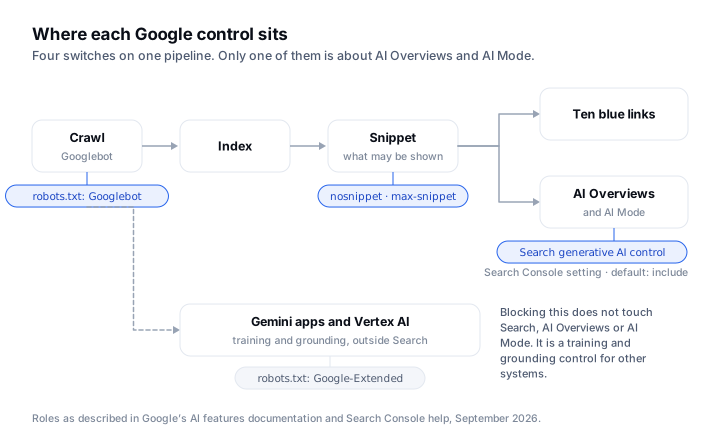
It is not the same as Google-Extended
This is the distinction most coverage gets wrong, and it matters because the two controls point at completely different things.
| Control | Governs | Effect on AI Overviews and AI Mode |
|---|---|---|
| Search generative AI control (Search Console) | Whether Google Search may show and ground on your pages in its generative AI features | Direct. Excluding removes you from the answer entirely |
Google-Extended (robots.txt) | Whether crawled content may train Gemini models and ground Gemini Apps and Vertex AI | None. Google states it does not affect inclusion in Google Search and is not a ranking signal |
Googlebot (robots.txt) | Whether Google may crawl the page at all | Total. Blocked pages are not indexed, so nothing downstream applies |
nosnippet, max-snippet, data-nosnippet | Whether and how much text may be shown | Restricts the text available to an AI Overview, at the cost of your ordinary snippets too |
Inheritance, which is where the surprises are
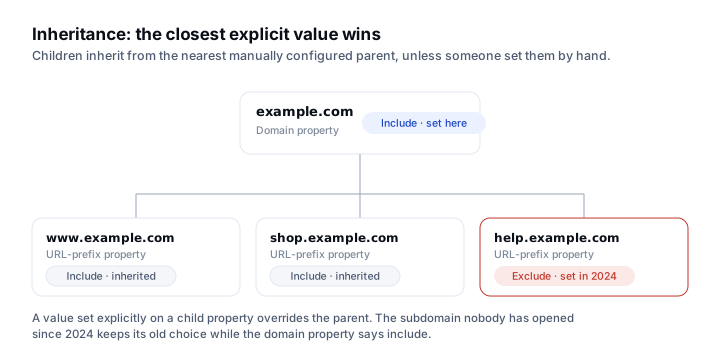
The setting inherits from the closest manually-configured parent property. If you have a domain property and several URL-prefix properties beneath it, a value set on the domain flows down to every child that has not been set explicitly. That is convenient until someone sets a value on a subdomain years ago, forgets, and then wonders why the parent’s setting is not applying there.
Two practical consequences. First, check the property that actually matches the URLs you care about, not just the domain property. Second, if you manage a site with staging, help-centre or shop subdomains registered separately, check each of them: the one you never think about is the one with the stale explicit value.
Should you exclude?
Almost certainly not, and the reasoning is short. Excluding does not stop Google competing with you for the answer; it stops Google using your answer while it does. The visitor still gets an AI Overview, assembled from whoever did not exclude themselves. You have removed your name from a surface your competitors remain on.
There are narrow cases where it is defensible: content licensed under terms you cannot square with generative reuse, or a legal position your counsel has taken. Those are genuine. “I do not want AI to steal my traffic” is not one of them, because the traffic goes somewhere either way.
What to do this week
- Open Settings on every Search Console property you own and record the current value and whether it is inherited or explicit.
- Reconcile it against your robots.txt. A site that allows
Googlebot, blocksGoogle-Extendedand has the generative AI control set to include is a perfectly coherent position: cite me, do not train on me. - Note the date of any change, then compare your Generative AI performance report either side of it. One to two days for the change, longer for the data to be meaningful.
- If you manage client sites, check this before the client discovers it themselves. An explicit exclude nobody remembers setting is a real and awkward find.
SearchLift reads this control’s state alongside your Generative AI performance data and your robots.txt rules in one place, so the three cannot quietly disagree with each other. It is part of the Search Console suite, and it sits next to the AI visibility tracking that tells you whether being eligible actually turned into being named. If the crawler side is what you are reconciling, the AI crawlers and robots.txt article covers every token and what each one really controls.
Common questions
- 01What is the Search generative AI control?
- A setting in Google Search Console that decides whether your site can appear in and ground Google’s generative AI features, meaning AI Overviews and AI Mode. Google completed its rollout to all sites worldwide on 31 August 2026. The default is to include the site.
- 02Does excluding my site from AI Overviews hurt my rankings?
- No. Google states the control is not used as a ranking or inclusion signal affecting other parts of Search. It governs the generative AI surface only.
- 03Is this the same as blocking Google-Extended?
- No, and confusing the two is the most common error. Google-Extended governs whether crawled content may train Gemini models and ground Gemini Apps and Vertex AI. Google states it does not affect inclusion in Google Search, which is where AI Overviews and AI Mode live. The Search Console control is the one that governs citation.
- 04How long does a change take to apply?
- Google indicates one to two days for the setting itself. Seeing the effect in your Generative AI performance report takes longer, because you need enough post-change data to compare against.
- 05Which property does the setting apply to?
- It inherits from the closest manually-configured parent property. A value set explicitly on a subdomain overrides the domain property, so check the property that matches the URLs you care about rather than assuming the domain-level value applies.
- 06Does excluding stop Google summarising my content without a link?
- Yes. Excluding removes the content from grounding as well as from the link cards, so the page is not used to compose the answer at all. That is the argument against excluding: the answer still gets written, just without you in it.