AI SEO for WordPress begins with one page a customer needs, not a new plugin. Pick a question asked before a sale, find the page that should answer it, and check four things: whether the answer is visible and accurate, whether Google can index the page, whether ChatGPT search can reach it, and whether you can tell a mention from a visit. Fix the first failed check before buying another score.
This is a page-level workflow for a WordPress owner. The broader AI SEO audit helps rank fixes across a whole site. Here, the WordPress details matter: a site-level visibility setting, the published post or page, an SEO field that may belong to a plugin, and the public HTML that search systems actually receive.
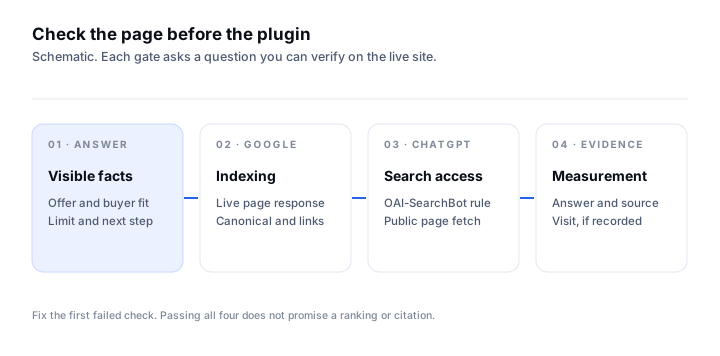
AI SEO for WordPress starts with one buyer page
- 01Write one unbranded customer question with a real constraint, such as location, compatibility or delivery area.
- 02Choose the one published WordPress page that should answer it and verify its facts with the business owner.
- 03Check WordPress search visibility and inspect that exact URL in Google Search Console.
- 04Check the public page response and the search crawler rule, then save the answer ChatGPT gives with web search.
- 05Make one verified page change, keep the previous answer, and record a later answer and any visits separately.
A buyer asks whether a service works in a place or whether a product meets a need. Your page should state the answer in ordinary text, near the top, with the relevant limit and a working next step. A keyword repeated in the title, footer and image alt text cannot replace that answer. If the claim depends on stock, a service area or a supported version, confirm it before publishing. If the information is not public, do not invent it for a search snippet.
In WordPress, read the published URL, not only the editor preview. Verify that the title and body a visitor sees match what you intended. Link to the page from a relevant service overview or older article. If two pages answer the same buyer question, choose the one that should lead rather than creating a third. A clear page and a clear internal path are a stronger starting point than another thin post aimed at the same phrase.
Do the same check on a phone. A buyer should see the answer, the important limit and the contact or purchase path without opening a dashboard or decoding an image. Put a precise question beside the page in your notes. If you later edit the page, you can reread the same question against the published text and tell whether the answer actually improved. This keeps the work focused on a buyer decision rather than on a plugin score.
Check the WordPress visibility setting before rewriting copy
WordPress’s Reading settings guide, read 1 November 2026, documents the “Discourage search engines from indexing this site” option. If a public site accidentally has it enabled, correct that setting and verify the live response. Then inspect the exact page in Search Console. A site-wide indexing instruction is a different problem from a weak article; more copy cannot fix it.
Google’s AI features guidance, read 1 November 2026, says its ordinary Search SEO practices remain relevant and there are no extra technical requirements for AI Overviews or AI Mode. A supporting page must be indexed and eligible to show a snippet. Check the selected canonical, index status, visible text and internal link to the page before installing an “AI” markup feature. No file or plugin guarantees inclusion.
| Observed problem | Check in WordPress or Search Console | Next action |
|---|---|---|
| Whole public site discourages indexing | Settings, Reading and live response | Correct the setting, then inspect the page again |
| Buyer page is absent from Google | Exact URL, canonical and internal links | Fix access or canonical, and link from a relevant page |
| Page is indexed but vague | Published page text and buyer question | Add verified fit, limit and next step |
| Assistant names another source | Saved answer and cited URL | Compare the cited facts with the page you control |
ChatGPT search access is a separate check
OpenAI’s crawler documentation, read 1 November 2026, identifies OAI-SearchBot as its search crawler and GPTBot as a training crawler. Those controls are independent. Read your live robots.txt and test the page response before assuming a plugin has blocked ChatGPT. A page being reachable does not mean it will be cited or recommended.
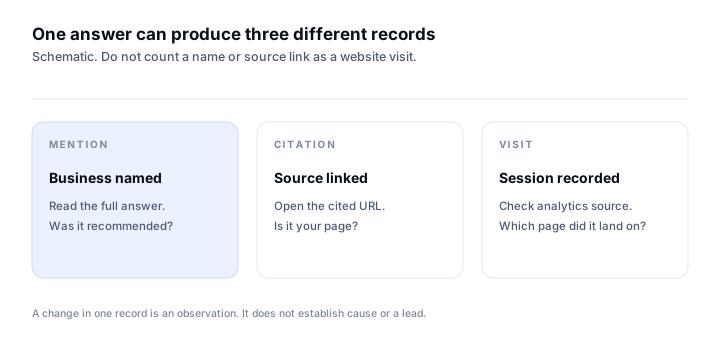
Run the buyer question with web search available, then save the complete answer and sources. Ask without your brand in the question. If ChatGPT names you but cites a directory, record a mention and a third-party citation, not a citation to your own WordPress page. If it cites your page but repeats a wrong fact, inspect the published text and the cited version. The crawler access guide explains the exact tokens, while the manual answer check gives a repeatable question worksheet.
Use WordPress tools for a verified change
The WordPress Posts REST API, read 1 November 2026, documents creating and updating posts. Its authentication guide documents Application Passwords for external API access over HTTPS. That provides a way for an authorized tool to publish a post, but it does not prove every SEO plugin exposes its own title and description fields to that tool. Verify the field on the live page after any write.
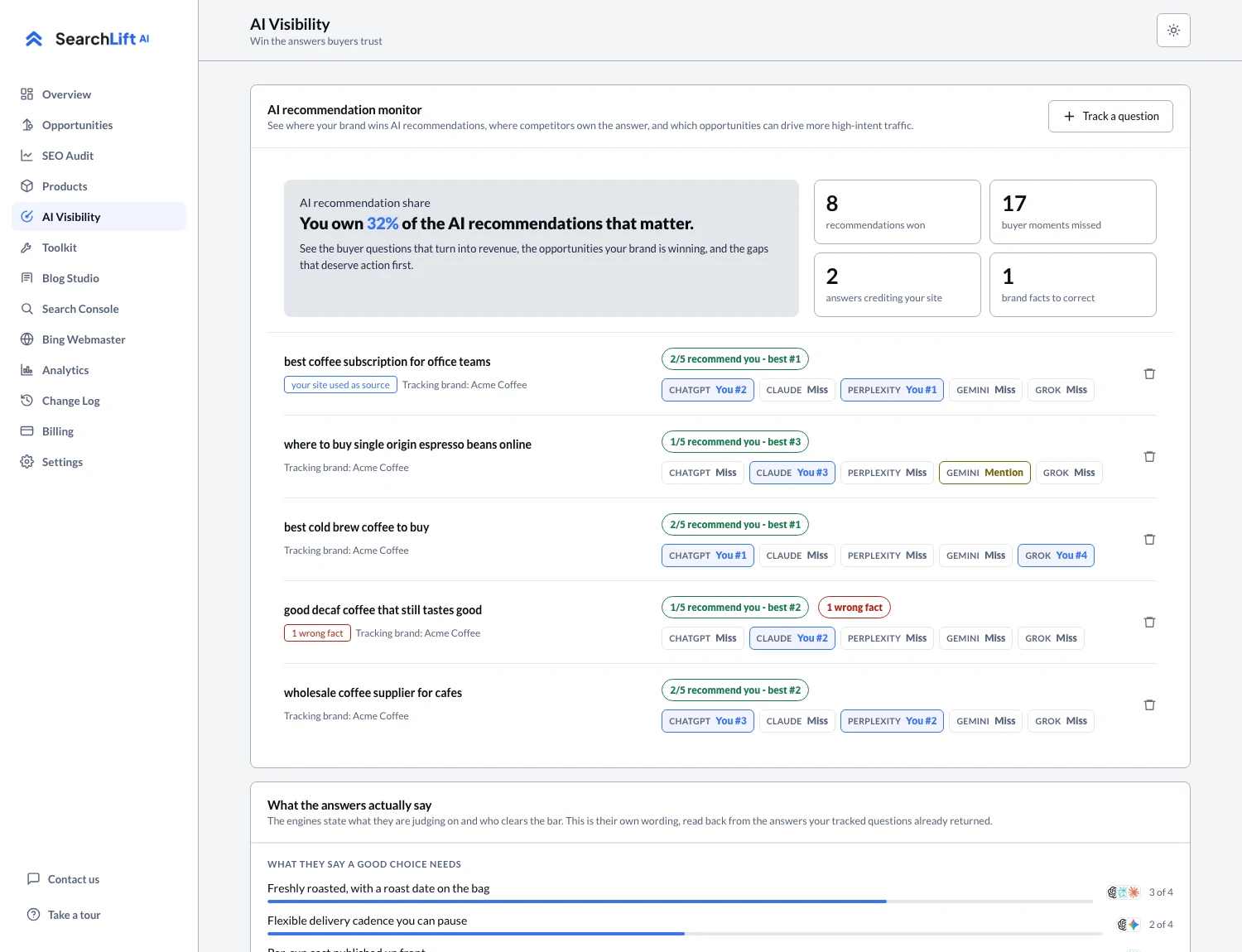
If you already use an SEO plugin, check which fields it writes and which fields a connected tool can access. SearchLift’s WordPress integration lists its current write capabilities and where it leaves a suggestion instead. It also runs an SEO audit and tracks saved buyer questions in the AI visibility screen. Review each proposed change against the real business facts before approving it. The tool cannot supply a service limit or product compatibility fact your team has never published.
Judge the result from the same question, not a score
After the page change is live, ask the same question with the same market and search setting. Keep the old and new answer, every cited source and the date of the page change. Do not call a different answer proof that the edit caused it; sources and assistant behavior can change independently. Look for a correct answer first, then a citation to the intended page, then a visit if someone actually follows it.
Google Analytics’ Traffic acquisition guide, read 1 November 2026, explains where session source data appears. Use it to check whether visits arrived from an assistant. A citation in an answer is not a session. A session is not automatically a qualified lead. For a small WordPress site, a short, dated table of page changes, answers, citations and visits is more honest than an unexplained AI visibility total.
Common questions
- 01What is AI SEO for WordPress?
- It is the work of making important WordPress pages answer buyer questions accurately, remain eligible for Google Search, and be reachable to relevant AI search crawlers. Measure assistant answers and site visits separately.
- 02Do I need an AI SEO plugin for WordPress?
- No special plugin is required for Google AI features. Start with a useful published page, ordinary indexing checks and a repeatable buyer question. A tool can help with audits or publishing when its capabilities match your WordPress setup.
- 03Can ChatGPT search use my WordPress page?
- OpenAI documents OAI-SearchBot for ChatGPT search. Check your live robots rule and public page response. Access allows consideration but does not guarantee a citation or recommendation.
- 04Will a WordPress REST API connection update every SEO plugin?
- No. The REST API supports authorized post operations, while SEO plugin fields have their own access rules. Confirm what the connected tool can write, and verify the result on the published page.
- 05How do I tell if the change helped?
- Save the same buyer question and its earlier answer, verify the page edit is live, then compare later answers, sources and analytics visits. Treat any change as an observation, not proof of cause.