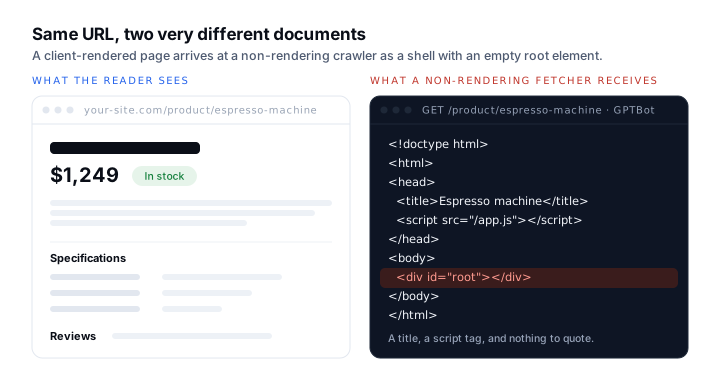
There is a specific, quiet failure that costs sites their place in AI answers, and it has nothing to do with content quality. The page reads perfectly in a browser. It scores well. It is indexed by Google. And when an assistant is asked the question that page answers, it cites somebody else, because what the assistant fetched was a nearly empty HTML shell with a <div id="root"> in it.
Googlebot renders JavaScript. It has for years, and Google documents the process. The AI crawlers are a different population with different budgets, and the safest working assumption is that most of them do not render at all.
Why this is not the same question as “is my site indexed?”
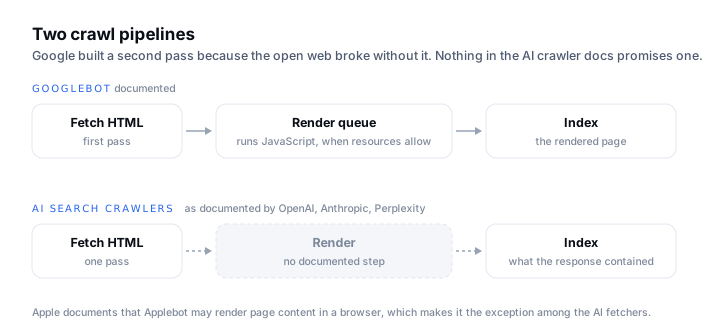
Google runs a two-pass process: crawl the HTML, then queue the page for rendering when resources allow, then index what the rendered page contained. That second pass is expensive, and Google built it because the open web broke without it.
An AI search crawler has a different job. It is assembling a corpus to retrieve from, at enormous scale, with no obligation to reproduce a browser. Nothing in OpenAI’s, Anthropic’s or Perplexity’s crawler documentation promises rendering. Apple is the interesting exception: its documentation states that Applebot may render page content within a browser, which is one reason Applebot behaves more like Googlebot than like the others.
So “Google indexes my React app fine” is true and irrelevant. It tells you Googlebot rendered it. It tells you nothing about what ClaudeBot received.
Test it yourself in ten minutes
This is the whole method. It needs curl and a browser, and it produces a number you can act on.
- 01Pick one URL that matters commercially: a product page, a pricing page, or the article you most want cited.
- 02Fetch it with a documented AI crawler user agent and save the response:
curl -A "GPTBot/1.2 (+https://openai.com/gptbot)" -s https://example.com/page > raw.html. Repeat forClaudeBotandPerplexityBotusing the exact strings in each vendor’s docs. - 03Strip the tags and count the words:
sed -e "s/<[^>]*>//g" raw.html | tr -s "[:space:]" "\n" | grep -c .. This is roughly what a non-rendering fetcher has to work with. - 04Open the same URL in a browser, view the fully rendered DOM, and count the words the reader actually sees.
- 05Compare the two numbers. If raw is within about 80% of rendered, you are fine. If raw is a tenth of rendered, your content does not exist for anything that does not run JavaScript.
- 06Repeat for one page per template (a product page, a listing page, an article), because frameworks often render one route type on the server and another on the client.
Two honest caveats. Setting a user-agent string does not make you that crawler; it tells you what your server and CDN return to that string, which is exactly the variable you control. And a vendor that does not render today may render tomorrow. Date your findings.
What the numbers usually mean
| Raw vs rendered word count | What it means | What to do |
|---|---|---|
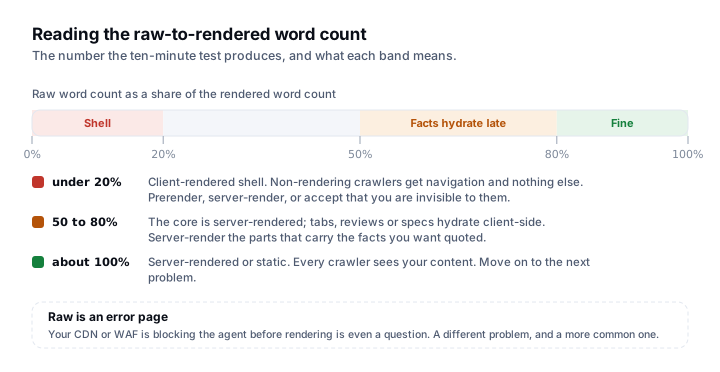
| Raw ≈ rendered | Server-rendered or static. Every crawler sees your content | Nothing. Move on to the next problem |
| Raw ~50–80% of rendered | Core content is server-rendered; tabs, reviews or specs hydrate client-side | Server-render the parts that carry the facts you want quoted |
| Raw <20% of rendered | Client-rendered shell. Non-rendering crawlers get navigation and nothing else | This is the finding. Prerender, server-render, or accept that you are invisible to most AI crawlers |
| Raw is an error page | Your CDN or WAF is blocking the agent before rendering is even a question | Different problem entirely, and a more common one than people expect |
What to do if the answer is bad
- Server-render the commercially important routes first. You rarely need to convert the whole application. The pages that answer buyer questions are the ones that need to exist in raw HTML.
- Put the facts in the first response, not in a lazy-loaded panel. Prices, specifications, hours and availability are exactly what an assistant is asked for, and exactly what tends to hydrate late.
- Do not solve it with a JSON-LD block alone. Google’s guidance is that structured data should match the visible page. Markup describing content a non-rendering fetcher cannot see is a mismatch waiting to be caught.
- Re-test after you ship. The word count is the metric. If raw did not move, the fix did not work, whatever the framework docs promised.
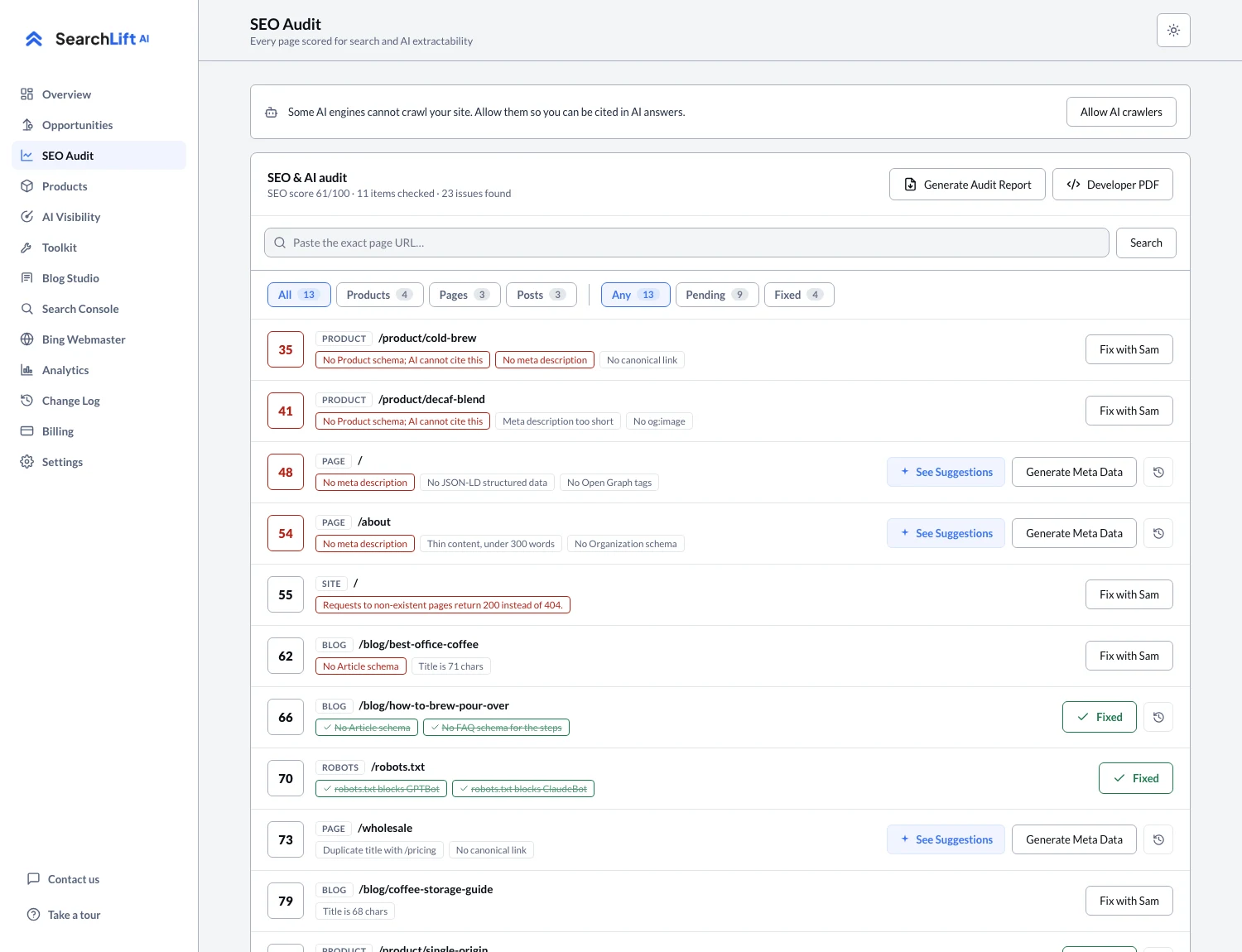
This is the single most common finding on a first SearchLift audit, and it is why the audit fetches every page the way a non-rendering crawler would rather than the way a browser does. If the fetch is failing before rendering is even reached, the AI crawlers and robots.txt article covers the access layer, and checking what the assistants currently say about you tells you whether the invisibility is already costing you answers.
Common questions
- 01Do AI crawlers execute JavaScript?
- Mostly no. Googlebot renders JavaScript as a documented second pass, and Apple states Applebot may render pages in a browser. OpenAI, Anthropic and Perplexity do not document rendering for their crawlers, so the safe assumption is that a client-rendered page reaches them as an empty shell. Test your own URLs rather than relying on any published table, including this one.
- 02My React site is indexed by Google. Am I fine?
- Not necessarily. Google indexing your site proves Googlebot rendered it. It says nothing about GPTBot, ClaudeBot or PerplexityBot, which are separate crawlers with separate budgets and no documented rendering step.
- 03How do I check what an AI crawler sees on my page?
- Fetch the URL with the crawler’s documented user-agent string using curl, strip the HTML tags, and count the remaining words. Compare that against the word count of the rendered page in a browser. A large gap means your content depends on JavaScript that the crawler probably never runs.
- 04Does server-side rendering help AI search visibility?
- It helps in the narrow, mechanical sense that your content exists in the first HTTP response instead of only after JavaScript runs. It is not a ranking factor. It is the difference between the content being available to be cited and not being available at all.
- 05Will adding schema markup fix a client-rendered page?
- No, and it can make things worse. Google asks that structured data match the visible content of the page. Markup asserting facts a non-rendering fetcher cannot see is a mismatch, not a workaround.