Optimizing a Webflow site for AI search is mostly a matter of knowing which screen each setting sits on. Webflow spreads the four things that decide what ChatGPT, Claude, Perplexity, Gemini and Grok can read across Page settings and Site settings, puts two of them behind a paid plan, and stages all four until you publish. None of that is documented in one place, and none of it is what the generic advice about question headings and summaries is talking about. This is the Webflow specific half: where each control lives, what it will and will not accept, and the order to work through them.
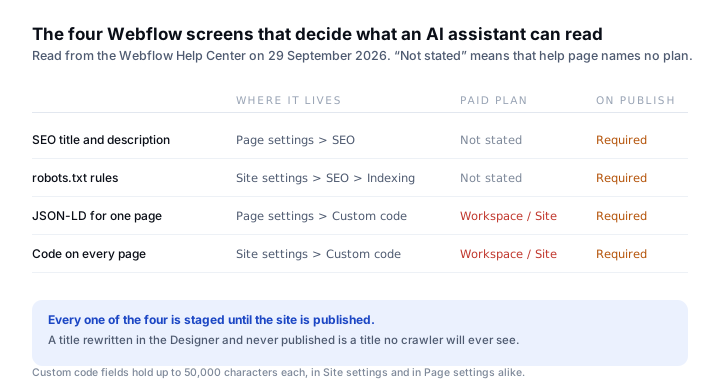
Two of the four controls are behind a paid plan
Page titles and meta descriptions are free to edit on any Webflow site, in Page settings under the SEO tab. Custom code is not. Webflow’s help page on custom code in head and body tags states the gate plainly: “If you have a Core, Growth, Agency, or Freelancer Workspace, or if your site has an active Site plan, Site managers and Designers can add custom code.” That single sentence decides whether you can add structured data to a page at all, because on Webflow structured data is custom code.
The same page sets the size of the field. “The Head code and Footer code sections in Site settings can accommodate up to 50,000 characters each, and custom code in the <head> tag and before the </body> tag in Page settings can accommodate up to 50,000 characters each.” Fifty thousand characters is roughly fifty schema blocks, so the limit is unlikely to bind on a normal site. It binds on a template page that tries to inline a script library.
The third fact on that page is the one people lose a week to. “The effects of custom code appear in preview mode, but they won’t go live until your site is published.” Preview is not the live page. An assistant reads the published page or it reads nothing.
- Page settings, SEO tab. The title and the meta description for one page. No plan stated on the help page.
- Site settings, SEO, Indexing. The robots.txt rules for the whole site.
- Page settings, Custom code. The head slot for one page. This is where JSON-LD goes. Paid Workspace or Site plan.
- Site settings, Custom code. Head and footer code for every page. Paid Workspace or Site plan.
Robots.txt is one screen, and the tokens are the whole job
Webflow’s help page on setting robots.txt rules gives three steps: go to Site settings, SEO, Indexing, add the rules you want, then “Click Save and publish your site”. It also notes that Webflow “adds a link to your sitemap in your robots.txt” by default, which is worth leaving on, and warns that “Not all bots follow the rules specified in your robots.txt file, especially malicious or poorly configured ones.”
The screen is easy. The content is where sites lose citations, because the crawlers that gather training data and the crawlers that fetch a page to answer a question right now are different tokens. OpenAI’s bots documentation says GPTBot is used to “crawl content that may be used in training our generative AI foundation models”, while OAI-SearchBot is used to “surface websites in search results in ChatGPT’s search features”, and that sites which opt out “will not be shown in ChatGPT search answers”. Blocking the first is a policy choice. Blocking the second removes you from the answer.
| Token | What it is for | Disallowing it |
|---|---|---|
GPTBot | Training data for OpenAI models | A policy choice. Does not affect ChatGPT search answers. |
OAI-SearchBot | ChatGPT’s search features | Removes the site from ChatGPT search answers. |
ClaudeBot | Training data for Anthropic models | A policy choice. |
PerplexityBot | Perplexity’s search index | Removes the site from Perplexity results. |
Google-Extended | Gemini and Vertex AI grounding | Does not affect Google Search ranking. |
User-agent: OAI-SearchBot
Allow: /

User-agent: PerplexityBot
Allow: /

User-agent: ClaudeBot
Allow: /

User-agent: GPTBot
Allow: /

User-agent: Google-Extended
Allow: /

Sitemap: https://example.com/sitemap.xml
Paste that into Site settings, SEO, Indexing, change the sitemap line to your own domain, save, and publish. The full token list, including the user action fetchers that robots.txt may not govern, is in AI crawlers and robots.txt.
Structured data cannot arrive through the Data API
This is the Webflow specific trap, and it catches every tool that writes to Webflow programmatically. The Data API can read the site, read and write page settings, and read and write CMS collections. It has no per page head slot. A title and a meta description can be written through it; a block of JSON-LD cannot, because there is no field in the API that holds one.
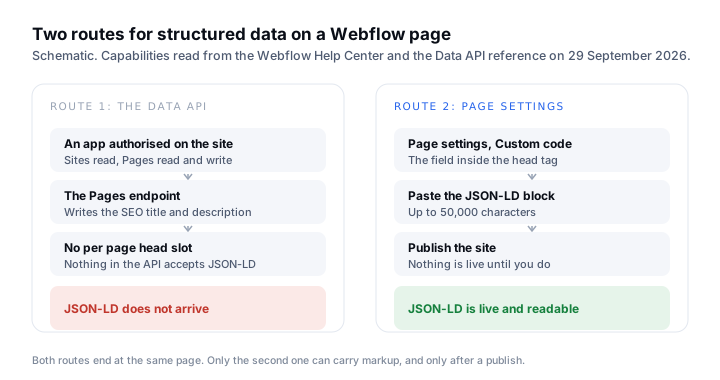
So the honest workflow on Webflow is split. Titles and descriptions can be automated. Structured data is generated for you and pasted by hand into Page settings, Custom code, in the field marked inside the head tag. It is two minutes a page, and it is the same two minutes whether you write the block yourself or a tool hands it to you.
<script type="application/ld+json">
{
  "@context": "https://schema.org",
  "@type": "Organization",
  "name": "Your Company",
  "url": "https://example.com",
  "logo": "https://example.com/logo.png",
  "sameAs": [
    "https://www.linkedin.com/company/your-company"
  ]
}
</script>
Markup is not a shortcut to being cited. Google states that its AI features need no special markup, and the argument for adding it anyway is that it makes the facts on the page machine readable and consistent, which is covered in does schema markup help you get cited in AI search.
Webflow’s own AEO tools are sold to Enterprise
Webflow now ships an AEO product of its own, and it is worth knowing where the line is drawn before you plan around it. The AEO feature page, read on 29 September 2026, lists measuring visibility in AI answers, monitoring AI crawl activity and connecting AI search to conversions, then states the plan requirement.
Available exclusively for Enterprise customers.
The same page adds that “All Webflow customers on an Enterprise Site plan get access to AEO agents, and AEO analytics is available with the latest version of Analyze for Enterprise”. No price is published. If you are on a Core, Growth or Freelancer Workspace, the four screens above are your whole toolkit inside Webflow, and the measuring half has to come from somewhere else.
The pass, in order
- 01Open Site settings, SEO, Indexing. Read the current robots.txt. If any line disallows
OAI-SearchBot,PerplexityBotorClaude-SearchBot, that is the first thing to fix. Save and publish. - 02Pick the one page that answers the buying question your customers actually type. Not the homepage. In Page settings, SEO tab, rewrite the title so it states the answer, and the meta description so it summarises it in a sentence a person would read aloud.
- 03In Page settings, Custom code, paste the JSON-LD for that page into the field inside the head tag. Organization on the homepage, Product or Service on a commercial page, FAQPage only where the questions and answers are visible on the page.
- 04Publish the site, then confirm the change is live by fetching the published page rather than trusting preview. Run
curl -s https://example.com/page | head -60and read the title and the JSON-LD out of the response. - 05Record what the assistants say about you today, before and after, so the change has a measurement attached to it rather than a feeling.
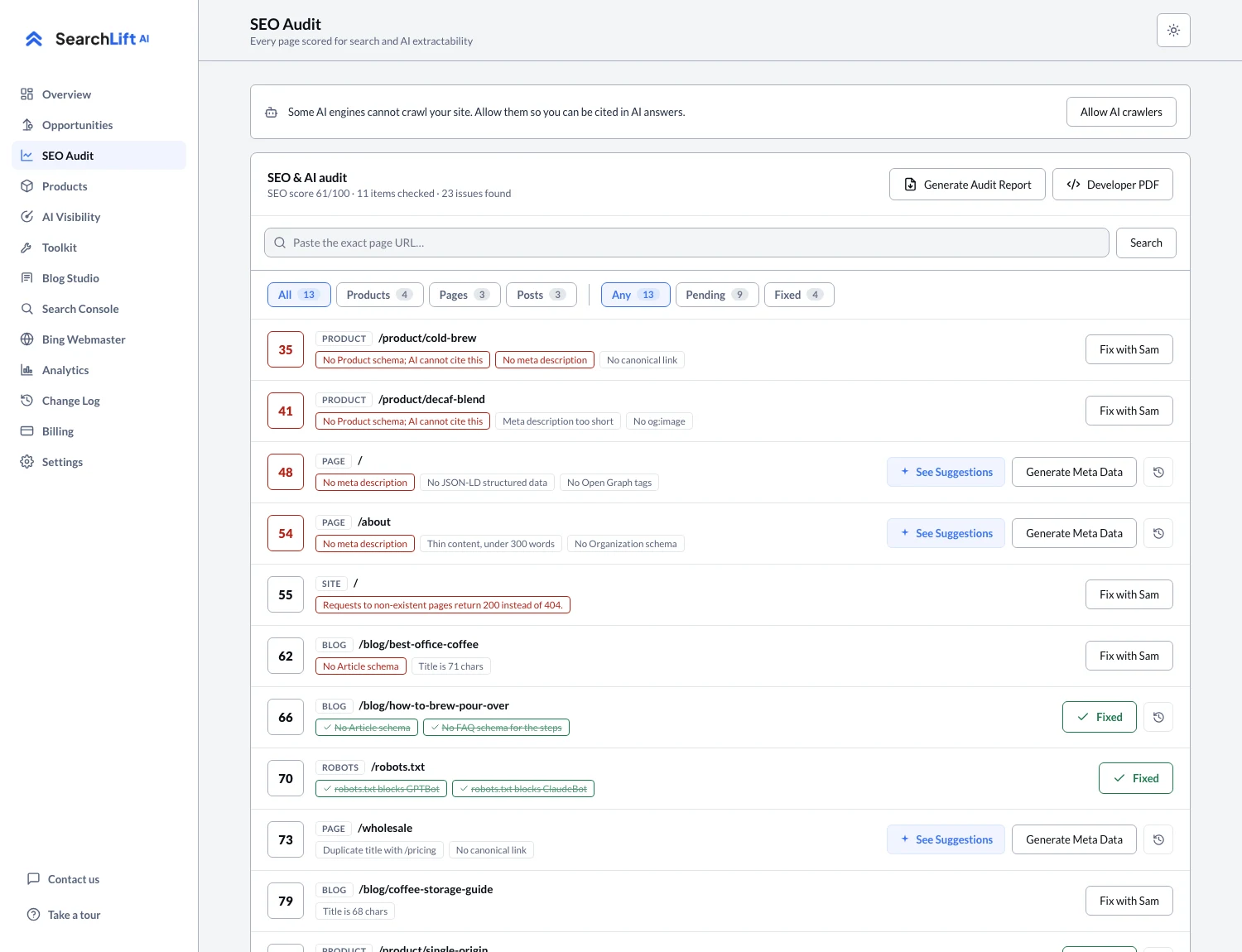
SearchLift connects to Webflow through the same Data API and works within the same limits: it audits the published pages, writes titles and descriptions through the Pages endpoint and publishes the change, hands you the JSON-LD to paste because the API has no head slot, and tracks what the five assistants say. The audit that finds the pages worth the pass is the SEO audit screen, and what the connector can and cannot write is set out on the Webflow integration page.
Common questions
- 01How do you optimize a Webflow site for AI search?
- Work through four screens in order: the robots.txt rules in Site settings, SEO, Indexing; the title and meta description in Page settings, SEO; the JSON-LD in Page settings, Custom code, inside the head tag; and then publish, because Webflow stages all four until you do.
- 02Does Webflow let you add structured data?
- Yes, through the custom code field in Page settings or Site settings, which holds up to 50,000 characters each. Webflow states that custom code needs a Core, Growth, Agency or Freelancer Workspace, or an active Site plan. It cannot be written through the Data API, which has no per page head slot.
- 03Can you edit robots.txt on Webflow?
- Yes. Site settings, SEO, Indexing holds the rules, and Webflow’s help page says to click Save and publish the site for them to take effect. Webflow adds the sitemap link by default.
- 04Is Webflow AEO available on every plan?
- No. Webflow’s AEO feature page, read on 29 September 2026, says it is available exclusively for Enterprise customers, with AEO agents on an Enterprise Site plan and AEO analytics through Analyze for Enterprise. No price is published.
- 05Why did my Webflow SEO change not show up?
- Almost always because the site was not published. Webflow’s documentation says the effects of custom code appear in preview mode but will not go live until the site is published, and the same staging applies to page titles and robots.txt rules.