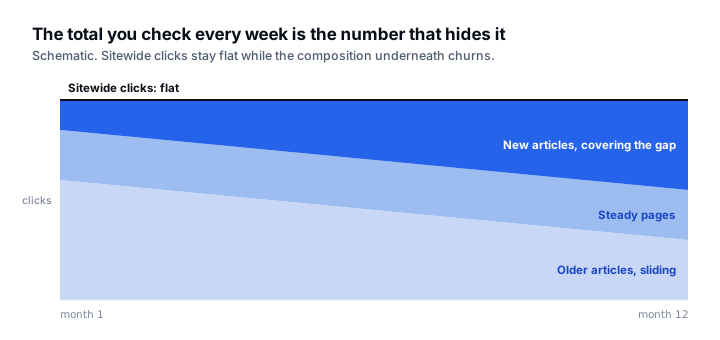
Content decay is hard to notice because the number you check every week is the one that hides it. Sitewide clicks stay roughly flat while the composition underneath churns: older articles slide, newer ones cover the gap, and by the time the total moves you have lost a year of compounding.
The fix is not to publish more. It is to look at pages rather than totals, with a defined signal instead of a vibe.
The procedure
- 01Open Performance → Search results and switch to the Pages tab.
- 02Use Compare and set the trailing 28 days against the same 28-day window one year earlier. Year-on-year, not month-on-month: it cancels seasonality, which is what makes most decay analysis wrong.
- 03Export to a sheet. The UI will not sort by difference, and difference is the entire point.
- 04Add a column for click change and one for percentage change. Filter out any page with fewer than 50 clicks in the earlier period; below that, percentages are meaningless.
- 05Sort by absolute clicks lost, not percentage. A page down 30% from 2,000 clicks matters more than one down 90% from 60.
- 06For the top 20, add the impression change. This is the diagnostic column, and it splits the list into two genuinely different problems.
Reading the impressions column
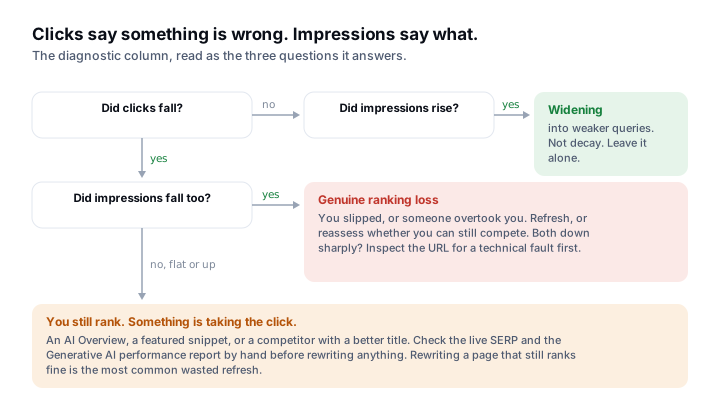
Clicks falling tells you something is wrong. Whether impressions fell with them tells you what.
| Clicks | Impressions | Diagnosis | Action |
|---|---|---|---|
| Down | Down | Genuine ranking loss. You slipped, or someone overtook you | Refresh, or reassess whether you can still compete |
| Down | Flat or up | You still rank. Something is absorbing the click: an AI Overview, a featured snippet, or a better competitor title | Check the SERP by hand. Often a snippet problem, not a content problem |
| Flat | Up | Widening into weaker queries. Not decay | Leave it alone |
| Down sharply | Down sharply | Possible deindexing or technical fault | Inspect the URL before touching the content |
For row two, Google’s Search Console now reports generative AI performance separately, which gives you somewhere to check rather than guess. Be honest about the limit of the inference: a flat-impressions, falling-clicks page is consistent with AI absorption, and also with a competitor writing a better title. Look at the SERP before concluding.
Triage: refresh, consolidate, or retire
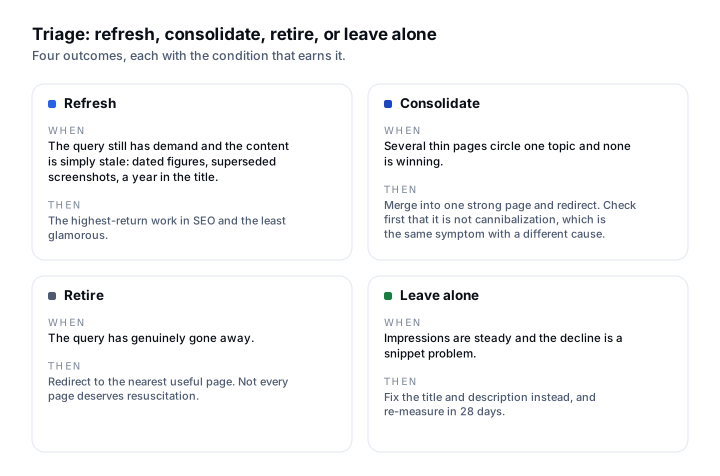
- Refresh when the page still targets a query with demand and the content is simply stale: dated figures, superseded screenshots, a year in the title. This is the highest-return work in SEO and the least glamorous.
- Consolidate when several thin pages circle one topic and none is winning. Merge into one strong page and redirect. Check first that you are not looking at cannibalization, which is the same symptom with a different cause.
- Retire when the query has genuinely gone away. Redirect to the nearest useful page. Not every page deserves resuscitation, and pretending otherwise is how you end up refreshing content nobody searches for.
- Leave alone when impressions are steady and the decline is a snippet problem. Fix the title and description instead, and re-measure in 28 days.
Why this beats a content calendar
A decayed page already has history, internal links and whatever authority it accumulated. Bringing it back is cheaper than earning the same clicks from a new URL, and the feedback loop is measured in weeks rather than quarters. The reason it rarely gets done is that nobody owns it: refreshing is invisible work, and publishing is visible work.
SearchLift runs this comparison continuously and turns the output into a ranked refresh queue, which is the same procedure without the spreadsheet. It sits in the Search Console suite, and the pages it surfaces feed the article studio as rewrite briefs rather than blank topics. If the decline turns out to be AI absorption rather than ranking loss, checking what the assistants say about you is the next question, and the Search generative AI control is worth confirming while you are in Search Console anyway.
Common questions
- 01What is content decay?
- The gradual loss of organic traffic to a page that once performed, usually from a mix of staleness, competitors publishing better answers, and shifts in how results are presented. It is hard to spot because sitewide totals stay flat while individual pages slide.
- 02How do I find decaying pages in Search Console?
- In the Performance report, open the Pages tab and compare the trailing 28 days against the same 28 days a year earlier. Export, filter to pages with at least 50 clicks in the earlier period, and sort by absolute clicks lost rather than percentage.
- 03Why compare year-on-year instead of month-on-month?
- Year-on-year cancels seasonality. A month-on-month comparison will tell you that your ski content declined in April, which is true and useless.
- 04My clicks fell but impressions did not. What does that mean?
- You still rank; something is taking the click before the user reaches you. That is usually an AI Overview or a featured snippet, but it can also be a competitor with a better title. Check the live SERP and your Generative AI performance data before rewriting anything.
- 05Should I refresh every declining page?
- No. Refresh pages whose query still has demand and whose content is merely stale. Consolidate thin pages circling one topic, and retire pages whose query has genuinely disappeared. Refreshing content nobody searches for is wasted effort.