






To track AI referral traffic in GA4, open Reports, then Acquisition, then Traffic acquisition, and find the AI Assistant row in the channel table. Google Analytics added that channel on 13 May 2026. It counts visits that arrive from assistants such as ChatGPT, Gemini, Claude, Copilot, DeepSeek and Grok, so for most sites the tracking already runs without any setup.
Some AI visits are counted in other channels. Clicks from Google’s AI Overviews and AI Mode are counted as Organic Search, and a visit that arrives with no referrer is counted as Direct. This guide covers the channel, the three reports to read, a custom channel group for older dates, and those gaps.
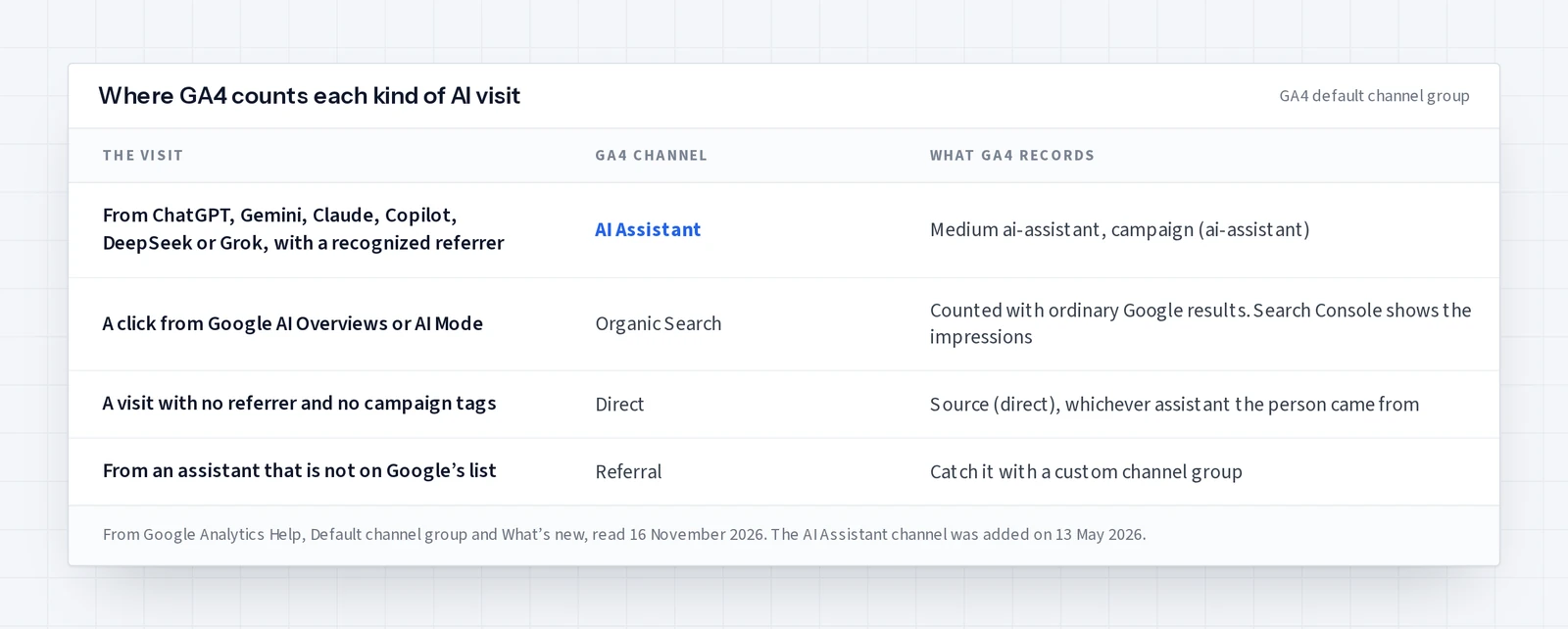
What the GA4 AI Assistant channel counts
AI Assistant is the channel by which users arrive at your site from sources like ChatGPT, Gemini, Deepseek, Copilot, or Grok. It excludes Google’s AI Overviews and AI Mode.
The channel works from one rule in the default channel group: the session medium is “ai-assistant”. Analytics sets that medium, and sets the campaign to “(ai-assistant)”, when the referrer matches its list of AI assistants. The announcement on Google’s what’s new page is dated 13 May 2026 and names ChatGPT, Gemini and Claude.
Default channel groups cannot be edited, and the announcement does not say whether visits recorded before 13 May 2026 were reclassified. If earlier months show no AI Assistant row, use the custom channel group further down, which Google says can be applied to reports retroactively.
How to track AI referral traffic in GA4, step by step
- 01Sign in to Google Analytics, select Reports in the left menu, then Acquisition and Traffic acquisition. The report shows where new and returning visitors came from.
- 02Keep the first column on the session channel group and find the AI Assistant row. Its sessions, engaged sessions, key events and total revenue are the totals for every recognized assistant.
- 03Change the first column to Session source / medium and type
ai-assistantinto the search bar above the table. Each row now shows one source that sent visits with that medium. - 04Open Engagement, then Landing page, and filter the report to the medium
ai-assistantto see which pages the assistants send people to. - 05Compare the AI Assistant row with Organic Search and Referral for the same date range, by week, and write down the date of every page change you make.
Google’s Traffic acquisition help page uses the same search bar method for one source, with the example “google / organic”. If the report is missing from your menu, an Editor can add it back to the left navigation.
Build a custom channel group for older dates and other assistants
A custom channel group lets you define your own AI channel and apply it to earlier dates. Google’s custom channel groups page, read 16 November 2026, says custom channel groups “can be applied to your reports retroactively”. A standard property can have two custom groups, each with up to 50 channels, and you need the Editor role or above to create one.
- 01In Admin, under Data display, select Channel groups, then Create new channel group. Analytics starts you with a copy of the default group.
- 02Add a channel named AI assistants with one condition: Source matches regex.
- 03Enter a regex that lists the assistant domains, such as the one below.
- 04Move AI assistants above Referral. Analytics puts each visit in the first channel whose rule it matches.
- 05Save, then choose the new group as the primary dimension in the Acquisition reports.
.*(chatgpt\.com|chat\.openai\.com|perplexity\.ai|claude\.ai|gemini\.google\.com|copilot\.microsoft\.com|grok\.com|deepseek\.com).*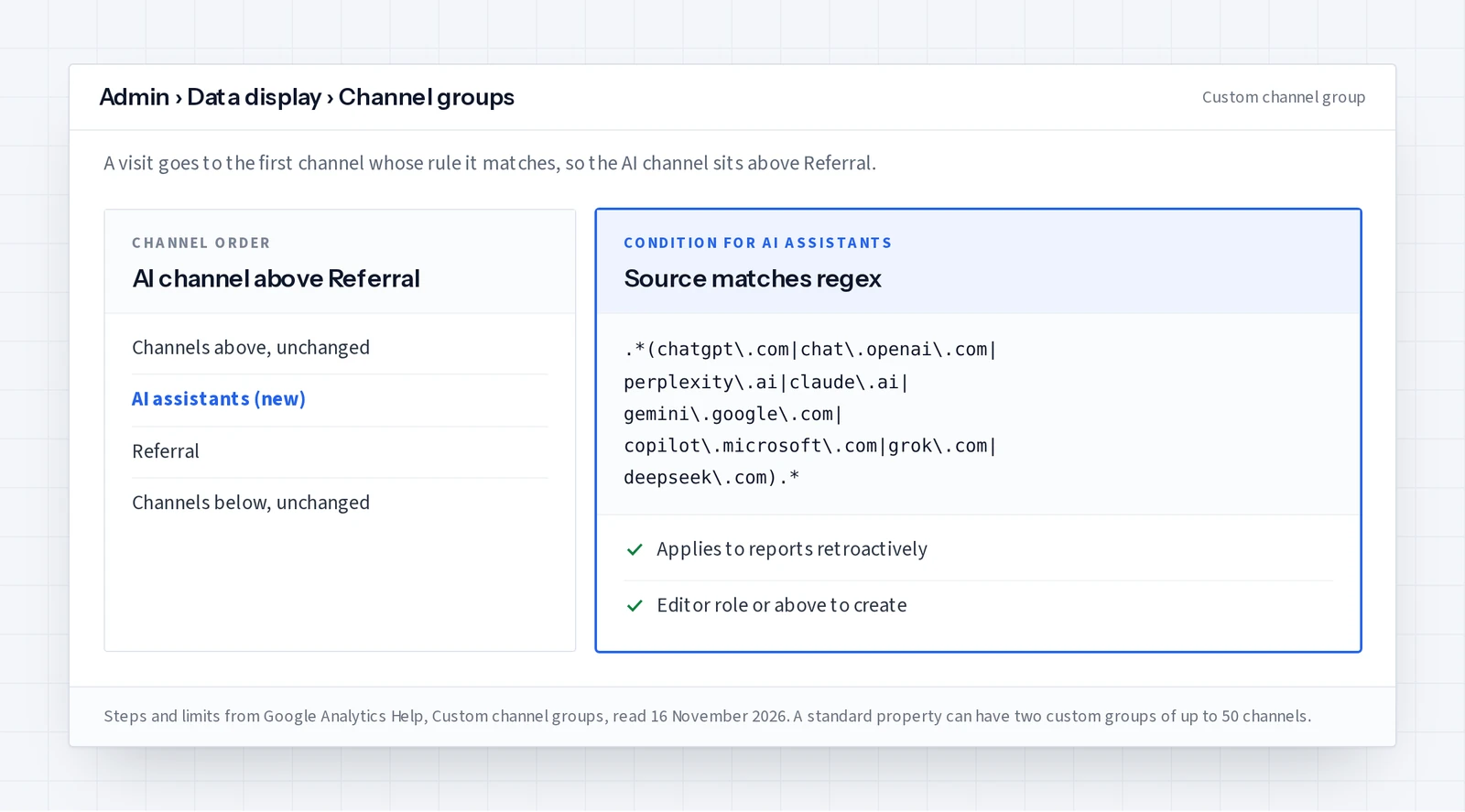
Google’s own example regex on that page is broader. Patterns such as .*gpt.* and .*copilot.* also match any other source that contains those letters. A list of domains keeps the channel narrow. Check your Referral rows every month for an assistant domain the list misses, and add it.
Which AI visits GA4 counts somewhere else
- Google AI Overviews and AI Mode. Google counts these clicks as Organic Search, so GA4 cannot separate them from ordinary results. Search Console’s Generative AI performance report shows impressions in AI Overviews and AI Mode by page, country, date and device.
- Visits with no referrer. A visit that arrives with no referrer and no campaign tags is counted as Direct, whichever assistant the person came from.
- Assistants Google does not recognize. These arrive as Referral. The custom channel group above catches the ones you list.
- Answers with no click. GA4 counts arrivals only. An answer that names your business without a click leaves nothing in analytics.
Because of that last gap, keep a record of the answers next to the visits. The method for recording what ChatGPT says, where you appear and which pages it cites is in how to rank in ChatGPT. For what AI visits are worth to a store, read AI referral traffic for retail teams.
Read the visits next to the answers each week
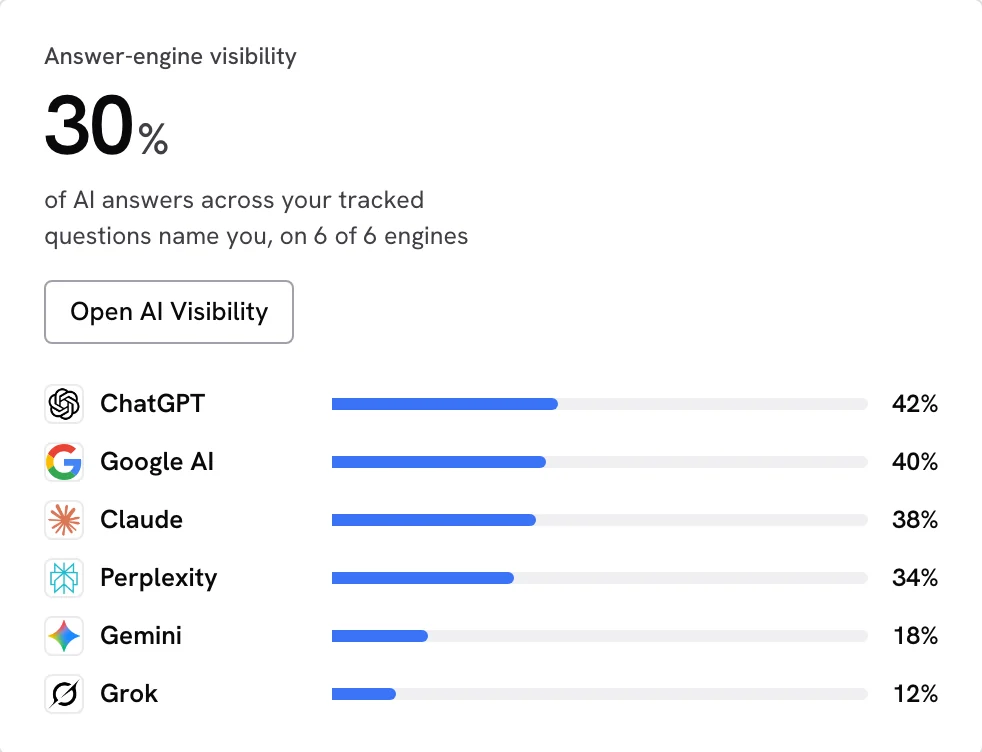
Once a week, note four numbers for the AI Assistant channel: sessions, engaged sessions, key events and the top landing pages. Next to them, note whether each tracked buyer question named you that week. When visits rise on a page you changed, check the date in your log before crediting the change.
SearchLift keeps both records in one place. With its tracking code on your site, visits from AI assistants are counted on their own, for each assistant, next to the answers saved by AI visibility tracking, and each fix is measured on the 14 days before against the 14 days after. AI referral traffic is included on every plan, Free included, and the Search Console screen covers the Google side.
Common questions
- 01How do I track AI referral traffic in GA4?
- Open Reports, then Acquisition, then Traffic acquisition, and find the AI Assistant row in the channel table. Change the first column to Session source / medium and search for ai-assistant to see each assistant. Google Analytics added the channel on 13 May 2026.
- 02How do I track ChatGPT traffic in Google Analytics?
- ChatGPT visits that arrive with a recognized referrer are counted in the AI Assistant channel with the medium ai-assistant. Filter the Traffic acquisition report by that medium to see ChatGPT as a source. A ChatGPT visit with no referrer is counted as Direct.
- 03Does GA4 show traffic from Google AI Overviews and AI Mode?
- GA4 counts those clicks as Organic Search, according to Google’s channel definitions, so they cannot be separated there. Search Console’s Generative AI performance report shows impressions in AI Overviews and AI Mode.
- 04Why is my AI Assistant channel empty?
- The date range may start before 13 May 2026, the site may have had no assistant visits in that range, or the visits may have arrived without a referrer and been counted as Direct. Check the Referral rows for assistant domains as well.
- 05Do I still need a custom channel group?
- Only to see a separate AI channel for dates before 13 May 2026, or to include an assistant that GA4 does not recognize. Custom channel groups can be applied retroactively, and a standard property can have two.